
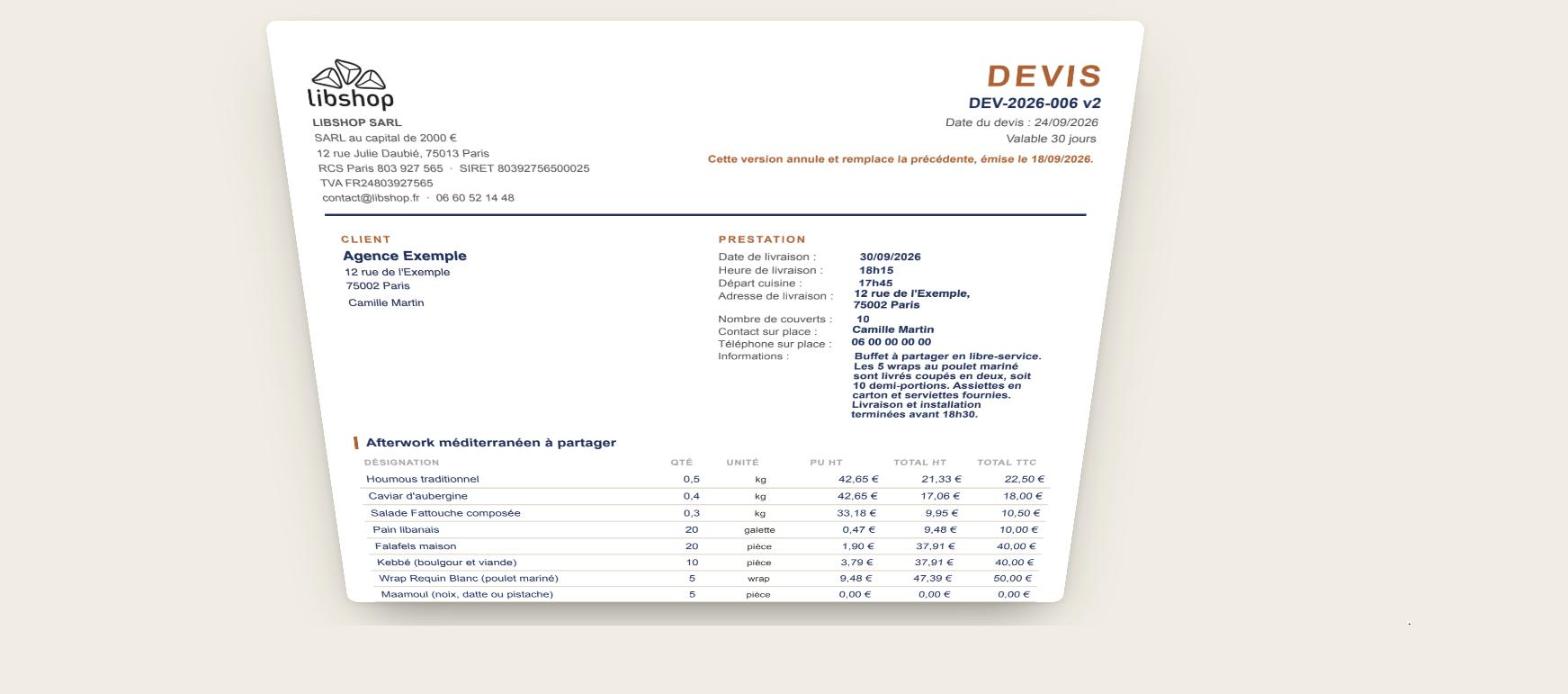
Automating quotes means ensuring that a customer request becomes a numbered, itemized quote that can be sent in minutes, without manual re-entry or calculation. For the catering service at my restaurants, a quote used to take me about an hour. Now it takes three. The tool was built on Google Sheets and Apps Script, without any subscription software, and the whole team uses it.
In this article, I tell you how I used to do it, what the tool does now, how it is built, and above all for which jobs this type of automation is really worthwhile (and for which it is not).
Previously: one hour per quote, and mistakes
I manage Libshop, a group of four Lebanese restaurants in Paris, with a catering service for businesses: team lunches, buffets, seminars, conferences. We process between 5 and 20 quote requests per month.
For years, the process was as follows: open the order file, duplicate the previous quote, delete the old lines, re-enter the products one by one, convert the prices including VAT from the menu to prices excluding VAT, recalculate the VAT, add the delivery charges, fill in the address, time, and on-site contact information, then export to PDF and write the email. And, once the service was delivered, repeat part of the process for the invoice.
The lost time wasn't the only problem:
- Calculation errors : an incorrectly adjusted quantity, a VAT omitted on a line, an old price remaining in the duplicated model.
- The invisible margin It was impossible to know, at the time of the quote, whether the order was truly profitable.
- No follow-up Which quotes were sent, accepted, followed up on, invoiced? It was all in my head.
- A dependency on a single person : in practice, I was the only one who knew how to make a proper quote.
Next: three minutes, from customer need to PDF
Today, a quote is prepared in four steps:
- Submitting the request : customer, number of place settings, format (individual meals or buffet), date, time and place of delivery, contact on site.
- Automatic calculation The quantities, prices excluding and including VAT, VAT, delivery and setup costs, price per person and margin are calculated from the catalogue.
- Quote generation : a numbered PDF, in the brand's colors, with all the legal notices, and a ready-to-go email.
- Follow up : each quote has a status (sent, accepted, refused), and an accepted quote becomes an invoice with one click, without re-entering anything.
The first quote generated using the tool was for a vegetarian buffet for 70 people at a Parisian university. The quote was produced in minutes, with the cost per person displayed immediately, which facilitated client approval.
| Before | After | |
|---|---|---|
| Time per quote | Approximately 1 hour | Approximately 3 minutes |
| Calculation errors | Regular | None, everything is calculated |
| Margin known before shipment | No | Yes, line by line |
| Invoice processing | Re-entered | One click |
| Who can provide a quote? | Me alone | The entire team |
With 5 to 20 quotes per month, this represents between 5 and nearly 20 hours saved each month. But the real benefit lies elsewhere: we respond faster than the competition, and a client who receives a clear quote within the hour is already eager to sign.
How it's built
No subscription-based quoting software, no heavy development. The tool is based on Google Sheets, which the team was already using, and on Apps Script, the scripting language integrated into Google Workspace, which automates everything that a spreadsheet cannot do on its own.
- A catalogue Each product has its unit of measurement, price, VAT rate, and material cost. This is the single source: a price change only occurs in one place.
- Parameters Company contact details, payment terms, delivery fee schedule, quote and invoice numbering.
- An input form : what is filled out for each new application.
- A script which generates the document, saves it as a PDF in the correct Drive folder, prepares the email and updates the tracking table.
Why didn't we use off-the-shelf quoting software? Because none of them calculated buffet quantities based on the number of guests, nor did they calculate profit margins based on our food costs. A generic tool forces you to adapt your business to the tool. A custom-built tool does the opposite, and there are no monthly license fees.
What I learned while building it
- First, completely overhaul your pricing structure. You can't automate prices that change based on mood. This work alone has already improved our profitability.
- Pay attention to the details that make it look professional. Continuous numbering, legal notices, payment terms, accurate VAT/excl. VAT conversion: an automatic quote must be more reliable than a manual quote, otherwise it is useless.
- Maintain control over the shipment. The tool prepares everything, but a human reviews and sends it. We automate the data entry and calculations, but not the customer relationship.
- Build using the tools the team is familiar with. This is what makes a tool actually used after three months.
What jobs does it work for?
This type of automation is profitable as soon as your quotes are built from recurring elements (products, services, packages) combined with a few variables (quantity, distance, duration, options).
| Job | This is calculated automatically |
|---|---|
| Caterer, restaurant, food truck | Quantities per cover, formulas, delivery, margin |
| Building craftsman | Surfaces, supplies, labor, travel |
| Event agency, equipment rental | Equipment, duration, installation, transport |
| Photographer, videographer | Packages, hours, alteration and delivery options |
| Training organization | Number of participants, days, additional costs |
| Cleaning, maintenance, home services | Surface area, frequency, additional services |
When it's not worth it
- If you do fewer than two or three quotes per month: a good template is sufficient.
- Each quote is a unique project that requires real thought (advice, architecture, custom development): it is the thought process that takes time, not the formatting.
- Your current billing software already does the job very well: there's no need to reinvent what works.
And what about AI in all of this?
For calculating a quote, AI isn't necessary, and that's a good thing: a price should be accurate and repeatable, not "probable." Where AI becomes useful is upstream and downstream: reading an email request and pre-filling the field, writing a personalized follow-up message, or preparing a suitable reminder when a quote remains unanswered. The right approach: rules for the numbers, AI for the text.
Are you spending too much time on your quotes?
I build this type of custom tool based on what you already use (Google Sheets, your point-of-sale system, your accounting software, your emails). Most projects take 1 to 3 days, billed at €650 excluding VAT per day or as a flat fee after an initial consultation. Details are available on my website. Services page.
In 30 minutes, I'll tell you if your quoting process can be automated, and what it would save you.
Frequently Asked Questions
Do you need to know how to code to use an automated quoting tool?
No. In everyday life, we fill in cells in a spreadsheet and click a button. The code is invisible to the user. It only takes someone to build it and maintain it.
Does a quote generated from Google Sheets have legal value?
Yes, provided it includes the mandatory information: company name and contact details, SIREN number, date, description and price of services, VAT rate, payment terms, and validity period. A properly configured tool will automatically add these details, thus minimizing omissions.
And what about mandatory electronic invoicing?
The reform of electronic invoicing between businesses is gradually requiring the use of an approved platform to issue and receive invoices. A custom-built tool remains very useful for quotes, sales tracking, and data preparation, which can then be transmitted to your invoicing platform.
How much does a custom quoting tool cost?
For a tool like the one described here, expect 1 to 3 days of work depending on the complexity of your pricing structure. There are no subscription fees after that: the tool runs on your Google account.



Leave a Reply