

What we are going to build
The principle can be summed up in one sentence: Meta captures the lead, a connector pushes it into a Zoho Campaigns list, and a Campaigns workflow automatically unfolds the email sequence.
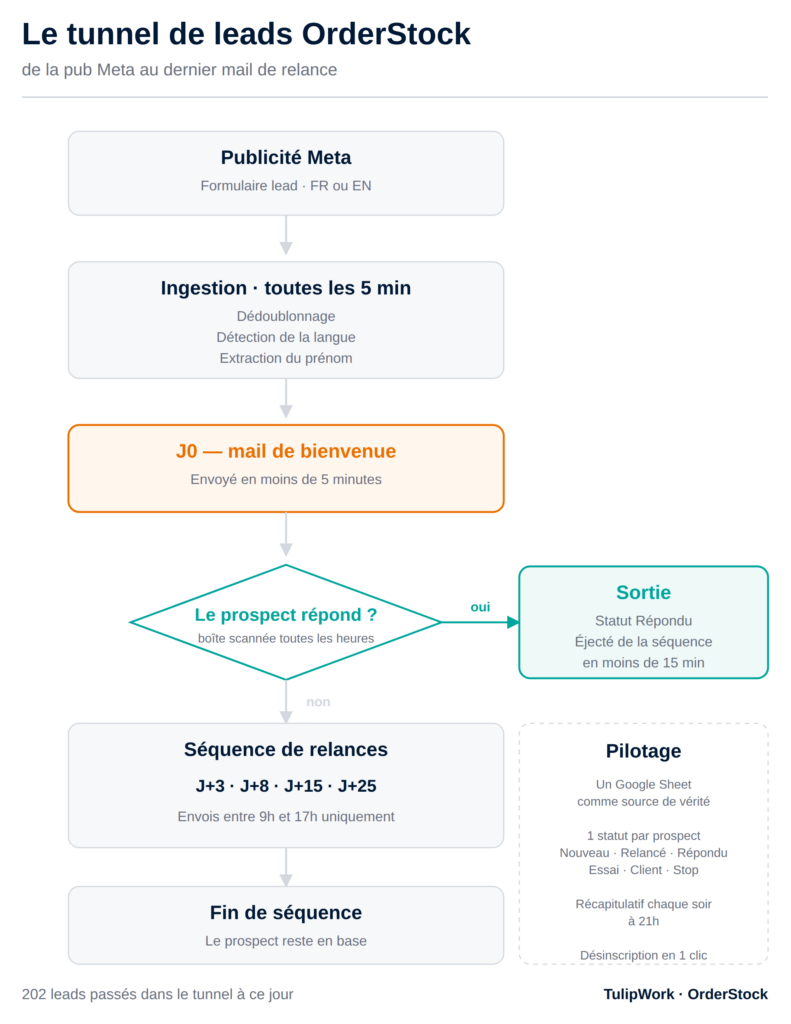
Three tools, two free accounts out of three, and only one rule to follow: each component does only one thing. Meta captures. The connector transports. Campaigns sends. As soon as you try to make a single component do two things, it becomes unmanageable.
If you're looking to automate your sales funnel and install a simple, practical, and effective low-code solution, Feel free to contact me, tell me your budget and I'd be happy to do it for you..
Step 1 — The Meta Form
In the Ads Manager, choose the objective Prospects, then create a instant form (Instant Form) attached to your advertisement. This is the form that opens directly in Facebook or Instagram, without leaving the application — which explains its conversion rates much higher than a classic landing page.
Ask for the bare minimum. I kept four fields: first name, email, company name, and a multiple-choice question about their inventory management. Each additional field reduces the volume, and you won't have time to analyze ten pieces of information per lead anyway.
Step 2 — Lists in Zoho Campaigns
Create a separate list for each language, not a single list for everyone. At my place: Leads FR And Leads EN. This is the point I most regret not having decided on sooner.
The reason is simple: Zoho Campaigns triggers its workflows upon entry into a list. One list = one workflow = one language. If you mix them, you'll have to add conditions to the workflow, wasting half a day for a less readable result.
Take this opportunity to create your custom fields (brand, source, date added, etc.). A small detail that cost me an hour: Avoid using accents in field labels, They don't work well in API calls.
Step 3 — The bridge between Meta and Campaigns
This is the only component that requires a third-party tool. Two options work:
- Zapier — trigger Facebook Lead Ads: New Lead, action Zoho Campaigns: Add Contact to List. The free plan provides 100 tasks per month and two-step scenarios, which is exactly what we need here.
- Make — same logic, 1,000 operations per month free of charge, with two scenarios active simultaneously.
In both cases, allow ten minutes: you connect your Facebook page, choose the form, connect Zoho, choose the list, and match the fields one by one.
Step 4 — The double opt-in trap
This is the step that causes most tunnels to fail, and it is not written anywhere visibly.
By default, a contact added to a Zoho Campaigns list via API or import They receive a confirmation email, but they only actually enter the list if they click on it. As a result, you lose half your leads to a second confirmation they don't understand, since they've already filled out a form.
This behavior is not driven by an API call parameter. It depends on a setting in the list: the status of its registration form. The Zoho documentation is explicit—with the registration form active, the contact receives a confirmation; with the form disabled, they are added without any confirmation.
Step 5 — The workflow that unfolds the sequence
In Campaigns, go to Automation → Workflows and create a workflow for each list.
The trigger is the list entry, with the "new contacts only" option. This option is your safety net: the day you import an old CSV file, your old contacts will not receive the sequence all at once.
Next, we alternate between waiting and sending messages. My sequence, based on five emails:
- J0 — the immediate answer to what was requested: the demo. This is the only email that 100% of the leads will open.
- Day 3 — Short follow-up: "Have you seen the demo?"«
- Day 8 — the story. Why I created the tool, what I was doing before.
- Day 15 — Helpful advice, with no sales pitch. The only email where I don't sell anything.
- Day 25 — the last one. «I’ll leave you alone after this one.»
Write these emails in plain text, Not in HTML with a pretty template. They're supposed to come from a human. A template with a banner and rounded buttons negates the whole effect.
Step 6 — Stop the sequence when someone responds
This is what separates a good sales funnel from an embarrassing one. If a prospect replies "yes, send it to me" and still receives the follow-up on day 8 asking "did you see the demo?", you've lost the sale and some credibility.
Campaigns does not read your email inbox. Therefore, you must, at a minimum, manually remove the contact from the workflow as soon as you process their reply: in the workflow, each contact can be removed via the "leave workflow" action.
Going further: the scripted version
The tunnel above is fully clickable, and that's already more than enough to get started. For my part, I went a step further because I had two needs that no-code didn't cover.
First need: to deduplicate and finely personalize. The leads arrive in a raw tab of a Google Sheet. An Apps Script script takes them, filters out addresses already known (including those between French and English), sends the J0 email itself, and then pushes the contact to the correct Campaigns list via the API. Along the way, it pre-calculates the salutations: "Hello Marc," if the first name is known, "Hello," otherwise; "at Le Comptoir," if the name is known, "at your establishment," otherwise. Traditional merge tags can't do this: they only have a raw fallback value.
Second requirement: automatic sequence output. The script scans the inbox, identifies responses from still-active prospects, updates their status in the Sheet, and removes them from the sequence. It also detects and ignores automated replies, flagging them in a daily summary at 9 PM.
If this version interests you, Tell us in the comments I'm preparing a commented script template, which you can adapt to your own spreadsheet and fields. I'll send it to those who request it.
What I would do differently
Three things, if I had to start again tomorrow.
Separate the languages from day one. I did it afterwards, and resuming contacts already in sequence is much more tedious than creating two lists from the start.
Test the entire channel with my own address before launching the ad. A lost real lead means wasted advertising budget. A lost test lead means ten minutes wasted.
Configure SPF, DKIM and DMARC before anything else. It's tedious, it's handled by your domain host, and until it's done, some of your emails go to spam without any warning.
The funnel is running smoothly today without me having to touch it. The only thing that still requires my attention is responding to the prospects who reply — and that's exactly where I want to spend my time.
If you're looking to automate your sales funnel and install a simple, practical, and effective low-code solution, Feel free to contact me, tell me your budget and I'd be happy to do it for you..

Leave a Reply