

Generate qualified leads without spending your days sending messages manually.
If you prospect on LinkedIn, you know how time-consuming it is. Sending invitations, following up, personalizing each message… it's a full-time job. That's exactly why I use Waalaxy For the past few months, and honestly, it's the tool that has most changed the way I work.
What is Waalaxy?
Waalaxy is a Chrome extension that allows you to automate your actions on LinkedIn: sending connection requests, prospecting messages, emails, follow-ups… all by defining… sequences that the tool runs automatically, while you do something else.
The promise: to go from 1 hour of manual prospecting per day to 10 minutes of configuration per week. In my case, that's entirely realistic.
Install Waalaxy in 3 minutes
Create your first campaign
A "campaign" in Waalaxy is a sequence of automated actions applied to a contact list. Here's how it works in practice.
1. Import your prospect list
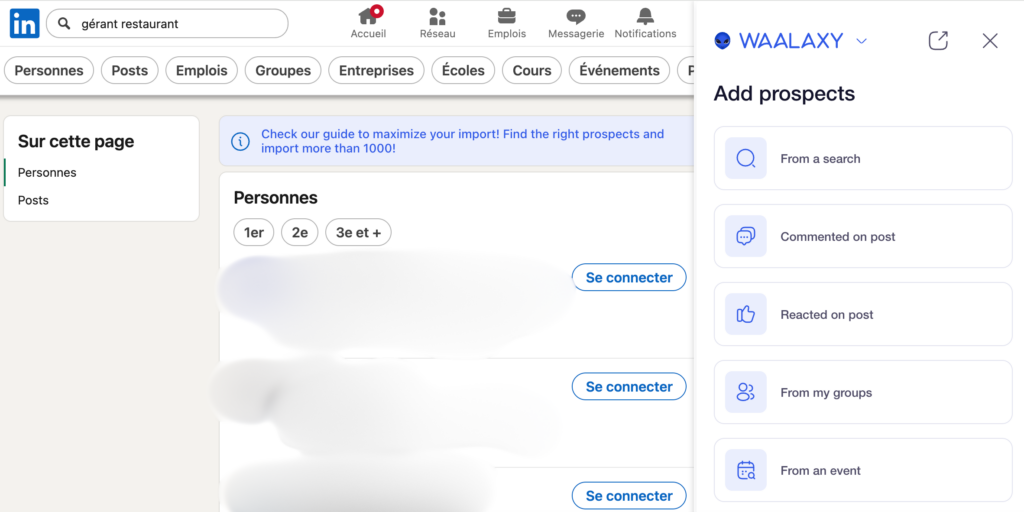
Start by searching on LinkedIn using the filters that interest you (industry, position, location, etc.). Open Waalaxy and click on "Import from LinkedIn". Waalaxy will then retrieve the profiles visible on your results page.
2. Choose a sequence
Waalaxy offers ready-to-use templates. For example: Invitation → Message 1 → Follow-up 3 days later. To begin, I advise you to choose a simple sequence with 2 or 3 steps. You can then make it more complex.
3. Write your messages
This is the most important step. Waalaxy allows you to use variables like {{first name}} Or {{business}} to automatically personalize each message. A good prospecting message remains short, human and value-oriented — never sales-oriented from the outset.
Avoid overly long or salesy messages in your initial contact. A simple "Hello {{first name}}, I'm working on [subject] and would like to discuss this with you" often converts much better than an overloaded text.
4. Launch and follow
Once the campaign is launched, Waalaxy sends actions gradually to stay within LinkedIn's limits. You can track acceptance and response rates and adjust your messages over time from the dashboard.
The advantages and limitations of Waalaxy
- ✓Intuitive interface, quick learning curve
- ✓Highly flexible multi-step sequences
- ✓Free trial plan
- ✓Responsive support in French
- ✓Clear tracking dashboard
- ✓Email integration (cold email)
- –LinkedIn daily limits to respect
- –Requires LinkedIn open in Chrome
- –Quotas vary depending on the LinkedIn profile
- –Paid advanced version
The rates
| Plan | Price | What you get |
|---|---|---|
| Freemium | Free | 80 invitations/month, basic sequences |
| Advanced Popular | ~€25/month | Unlimited sequences, cold email, integrated CRM |
| Business | ~€75/month | Teams, API access, priority support |
For solo use, the plan Advanced is more than enough. The return on investment is quick if you generate even just one customer per month using the tool.
Ready to automate your LinkedIn prospecting and save several hours per week?
My tips for getting started
After several months of use, here's what I wish I had known from the start:
Start small. Launch a simple initial campaign with around twenty contacts to test your message before scaling up.
Truly personalize it. First name/company variables are good, but adding a specific mention of the person's profile makes all the difference to response rates.
Respect the boundaries. LinkedIn monitors automated behavior. Waalaxy handles this intelligently, but stay within the recommended volumes (approximately 50 to 80 invitations per week for a standard profile).
Analyze and adjust. Check your statistics every week. An acceptance rate below 25% (%) is often a sign that your targeting or message needs to be reviewed.
Waalaxy doesn't replace a real prospecting strategy, but it allows you to execute it on a scale you couldn't achieve manually. It's the tool I wholeheartedly recommend to anyone doing B2B prospecting on LinkedIn.


Leave a Reply